Restrict Extension Registration Based on IP Address
This topic describes how to allow devices with a specific IP address or in a specific IP section to register extensions on Cloud Voice.
Background information
By default, Cloud Voice allows SIP registrations without the limit of IP address. In case hackers remotely register extensions and make expensive phone calls, you can restrict that only devices with a specific IP address or in a specific IP section can register extensions on Cloud Voice.
Procedure
- Log in to PBX web portal, go to , edit the desired extension.
- Click Security tab.
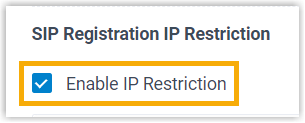
- In the SIP Registration IP Restriction section,
select the checkbox of Enable IP
Restriction.
- Set which IP address or IP section is allowed to register the extension.
- Click Add IP.
- In the Permitted IP and Subnet Mask fields, set the allowed IP address or IP section.
- Click Save and Apply.
Result
Only device with the IP address or in the IP section can register the extension.