Receive Faxes by Email
Cloud Voice provides fax to email feature that allows you to receive faxes as PDF by email. This topic describes how to receive faxes by email.
Prerequisites
- Make sure the PBX system email works, or the PBX cannot forward the received faxes to an extension user's email.
- Make sure there is a valid email address assigned to extension.
- Optional: Customize the fax email template.
Procedure
- Log in to PBX web portal, go to , edit the inbound route for incoming faxes.
- If you receive faxes through a dedicated line, go to Default
Destination section.
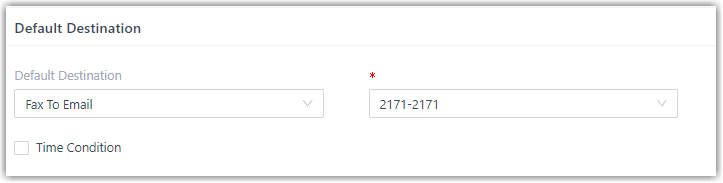
- In the Default Destination drop-down list, select Fax To Email.
- Select an extension user to receive faxes by email.
- If you receive faxes through a shared line, do as follows:
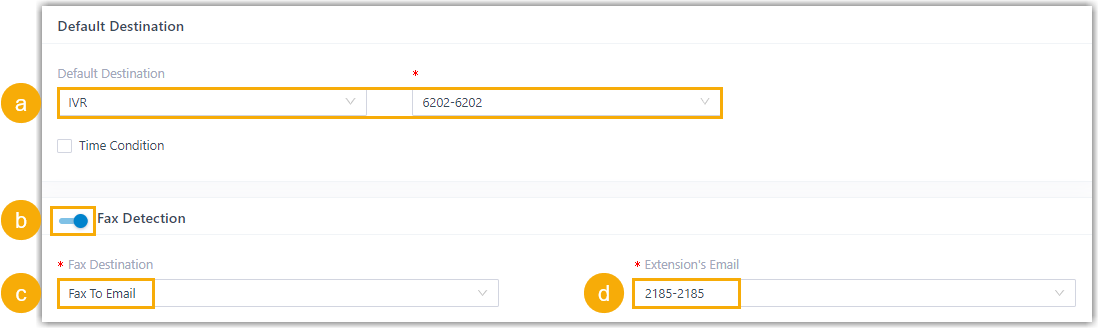
- In the Default Destination drop-down list, select IVR, then select a specific IVR.
- Turn on the switch of Fax Detection.
- In the Fax Destination drop-down list, select Fax To Email.
- In the Extension's Email drop-down list, select an extension user to receive faxes by email.
- Click Save and Apply.
Result
When receiving a fax, PBX converts the received fax and simply forwards it to the email address as an PDF attachment.