Monitor Secretary's Call Status
With the Boss-Secretary feature enabled, you can set up function keys and configure the IP phone for the boss, allowing the boss to check if the secretary is currently handling his or her call by monitoring the secretary's call status through Cloud Voice App clients and IP phone.
Monitor secretary's call status on Cloud Voice App clients
By setting up function key(s) for the boss's extension, the boss can monitor secretary's call status through Cloud Voice App Desktop Client, Cloud Voice App Web Client, and Cloud Voice App for Google.
- Prerequisites
- Procedure
-
- Log in to PBX web portal, go to , select the boss extension and click
 .
. - Click the Function Keys tab.
- Configure the following settings to subscribe to the secretary's
call status.

- Type: Select Boss-Secretary Feature.
- Value: Select the Secretary extension.
- Label: Optional. Enter a display name for this function key.
- Click Save.
- Log in to PBX web portal, go to , select the boss extension and click
- Result
- The boss can monitor the secretary's call status by the icons in the
Function Keys list of Cloud Voice App clients.
- Icons & Descriptions
-
 : The secretary
is NOT handling any calls for the boss.
: The secretary
is NOT handling any calls for the boss. : The secretary
is answering calls for the boss.
: The secretary
is answering calls for the boss. : The secretary
is putting a call on hold, waiting for the boss to
answer.
: The secretary
is putting a call on hold, waiting for the boss to
answer.
- Cloud Voice App clients
-
Figure 1. Cloud Voice App Web Client & Cloud Voice App Desktop Client 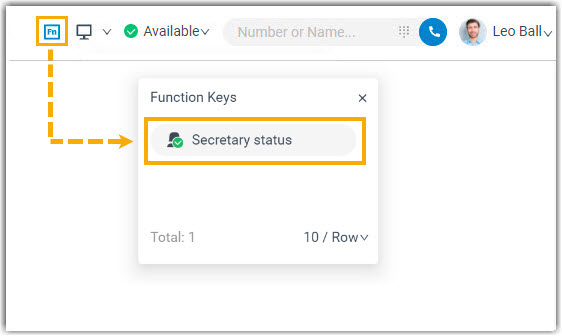
Figure 2. Cloud Voice App for Google 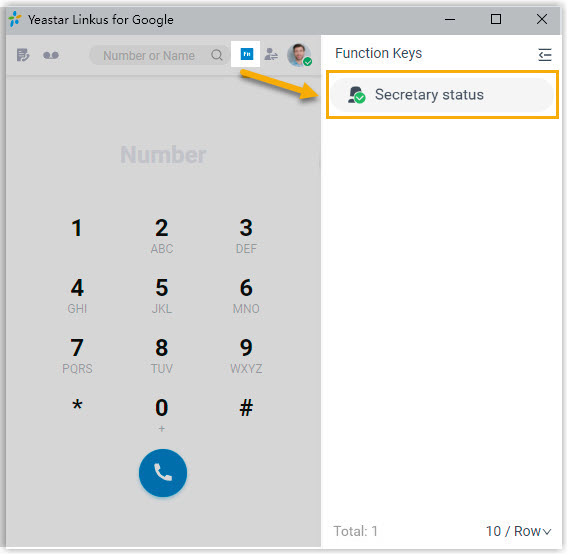
Monitor secretary's call status on an IP phone
By setting up the boss's IP phone, the boss can monitor the secretary's call status by the BLF LED, and resume calls transferred from the secretary using the BLF key.
- Prerequisites
-
- You have set up function keys for boss to monitor secretary's call status.
- Ensure that the IP phone is connected to Cloud Voice via auto provisioning, and has been
assigned to the boss extension.Note: For more information about auto provisioning, see Auto Provision IP Phones.
- Procedure
-
- Log in to PBX web portal, go to .
- Click
 beside the boss's phone.
 - In the pop-up window, click OK.
- Result
- The boss can monitor the secretary's call status through the BLF LED on his
or her IP phone:
- Solid Green: The secretary is NOT handling any calls for the boss.
- Solid Red: The secretary is answering calls for the boss.
- Flashing Red: The secretary is putting a call on hold,
waiting for the boss to answer. And the boss can press the BLF key
to resume and answer the call.Note: If the boss is using a Fanvil phone, you need to set the BLF Hold LED to either Slowblink or Fastblink. Otherwise, the BLF LED will not flash when the secretary places a call on hold.