Synchronize Active Directory Organizational Units to Cloud Voice
This topic describes how to customize the synchronization rule for Active Directory (AD) organizational units, PBX system will synchronize the specified AD organizational units to either PBX organizations or extension groups accordingly.
Limitation
The number of AD organizational units that can be synced depends on the organizations / extension groups that PBX system can create, as the following table shows.
| Maximum Number of Extensions (N) | N ≤ 50 | 50 ≤ N ≤ 200 | N > 200 |
|---|---|---|---|
| Maximum number of organizations | 50 | 200 | 500 |
| Maximum number of extension groups | 63 | 63 | 63 |
Prerequisites
You have integrated Cloud Voice with Active Directory .
Procedure
- Log in to PBX web portal, go to .
- In the Organizational Unit Synchronization section,
turn on the switch.

- Configure the following synchronization settings according to your need.
- Mirror organizational units
- Mirror organizational units from Active Directory and retain the hierarchical structure.
-
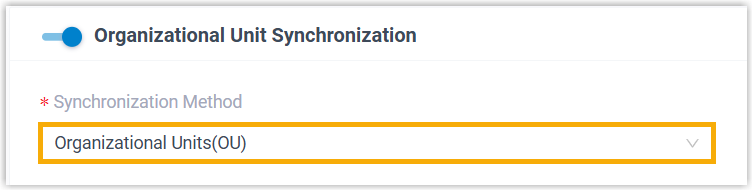
- In the Synchronization Method
drop-down list, select Organizational
Units(OU).
- In the Synchronize for
drop-down list, specify the AD organizational units
that you want to synchronize to PBX.
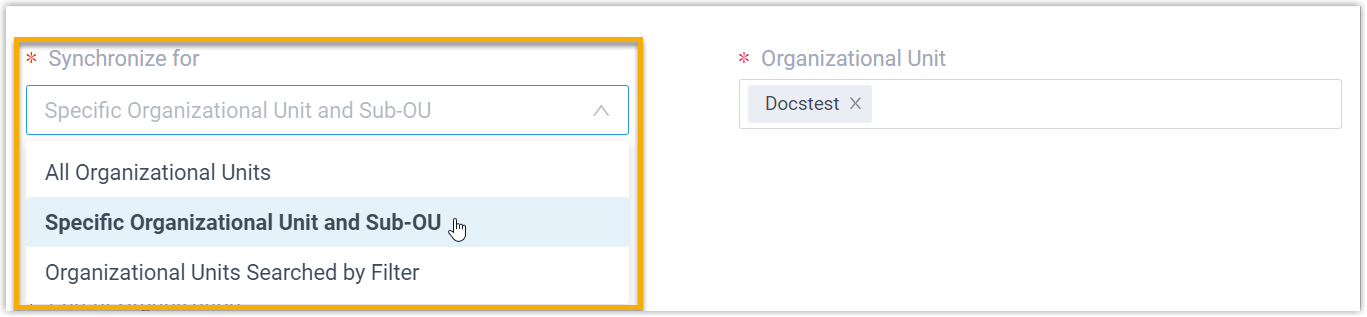
Option Description All Organizational Units Synchronize all AD organizational units within the connected directory to PBX. Specific Organizational Unit and Sub-OU Synchronize the specified organizational unit(s) together with the sub-OUs to PBX.
You can select the desired organizational unit(s) from the Organizational Unit drop-down list.Organizational Units Searched by Filter Synchronize the AD organizational units that match the filter criteria to PBX.
You can specify the LDAP search filter in the Search Filter for Organizational Unit field to locate specific organizational units.For example, enter (&(objectCategory=organizationalUnit)(ou=sales*)) to search organizational units with the name starting with "sales".
Note: In future use, if you change range of AD organizational units to be synced, you can decide how to deal with the organizations or extension groups that are no longer synced from the AD organizational units via the Auto delete the Organizations/Extension Groups no longer in sync option.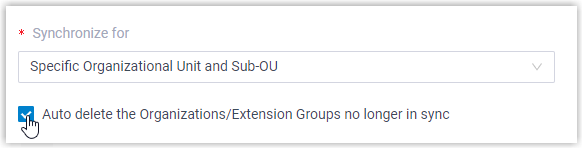
- If selected, the organizations/extension groups will be deleted during the next synchronization.
- If unselected, the organizations/extension groups will be retained and fully managed by the PBX.
- In the Synchronize
to field, determine the data type to
which the AD organizational units will be synced.

Option Description Organization Synchronize the AD organizational units and the sub-OUs to PBX organizations.
You can set the company name in the Company Name field as needed, and select the organization to which the synced organizational units belong in the Parent Organization drop-down list.Extension Group Only synchronize the MINIMAL organization units to PBX extension groups.
- In the Synchronization Method
drop-down list, select Organizational
Units(OU).
- Synchronize organizational units based on user object property
- Synchronize organizational units based on the value of a specific user object property.
-
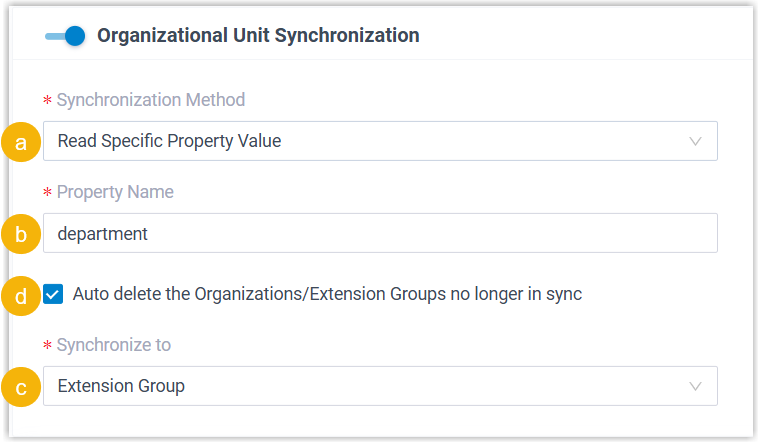
- In the Synchronization Method drop-down list, select Read Specific Property Value.
- In the Property Name field, enter the property name.
- In the Synchronize
to field, determine the data type to
which the AD organizational units will be synced.
Option Description Organization Synchronize the AD organizational units and the sub-OUs to PBX organizations.
You can set the company name in the Company Name field as needed, and select the organization to which the synced organizational units belong in the Parent Organization drop-down list.Extension Group Only synchronize the MINIMAL organization units to PBX extension groups. -
If you want the system to automatically delete the organizations or extension groups that are no longer synched from the AD organizational units, select the checkbox of Auto delete the Organizations/Extension Groups no longer in sync.
Note: This helps automatically remove unused organizations or extension groups when the synchronization scope changes.- If selected, the organizations/extension groups will be deleted during the next synchronization.
- If unselected, the organizations/extension groups will be retained and fully managed by the PBX.
- Click Save.Note:
- If it is the FIRST time you save the synchronization-related settings, PBX will perform the initial synchronization immediately.
- Otherwise, you can manually perform a directory synchronization or wait for the automatic directory synchronization.
Result
You have created your custom synchronization rule for AD organizational units.
During a synchronization process, PBX system performs LDAP queries within the Active Directory based on the rule, and synchronize the desired AD organizational units as well as the updated information to PBX. After the synchronization, the followings can be implemented:
- You can check the synchronization result in the Organizational
Unit Synchronization section.

- The PBX organizations/extension groups associated with AD organizational
units come with a label
 , and can NOT be deleted.
 - You can NOT manually update the information of the associated PBX
organizations, or the name and group member of the associated PBX extension
groups.Note: The information can only be modified within the Active Directory and updated to the PBX during a synchronization.