Connect Cloud Voice and Cloud Voice TG400 Gateway
This topic describes how to connect Cloud Voice and Cloud Voice TG400 gateway, so as to extend 4G trunks on the PBX.
Requirements
The version of Cloud Voice is 84.10.0.30 or later.
Procedure
Step 1. Create a SIP account trunk on Cloud Voice PBX system
- Log in to PBX web portal, go to , click Add.
- Configure the trunk settings.
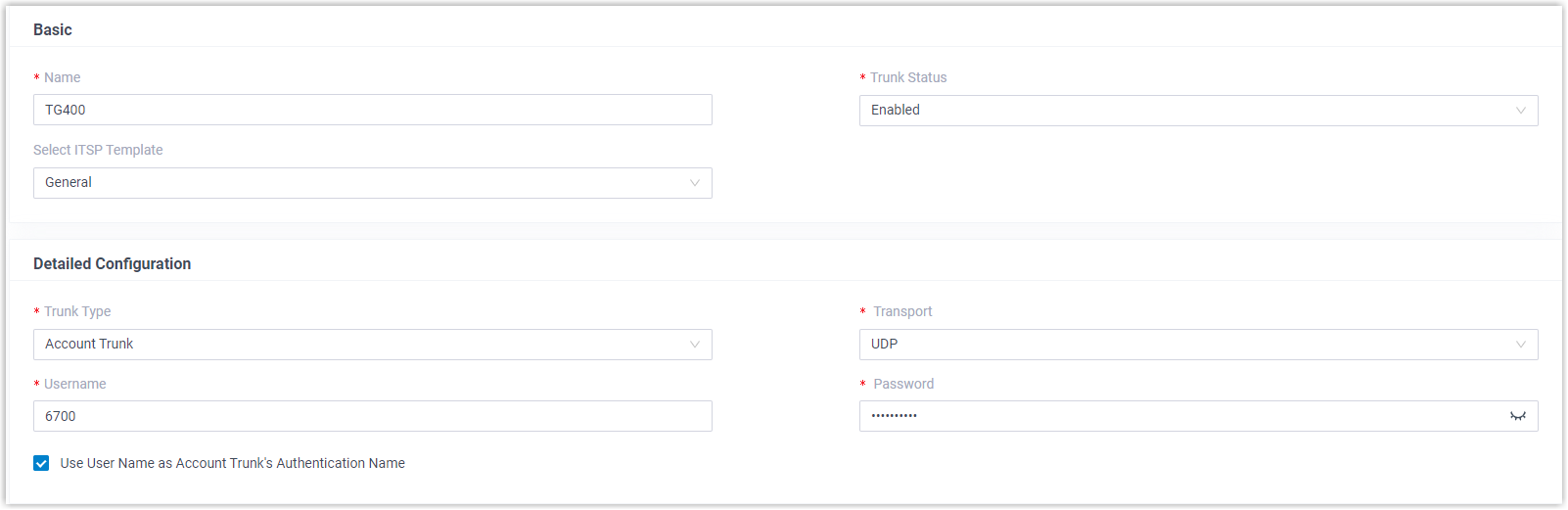
- Name: Enter a name to help you identify it. For example, TG400.
- Trunk Status: Select Enabled.
- Select ITSP Template: Select General.
- Trunk Type: Select Account Trunk.
- Transport: Select UDP.
- Username: Specify a
username for the trunk.Note: The username is regarded as the trunk number.
- Password: Specify a password that is associated with the username.
- Use User Name as Account Trunk's Authentication Name: Enable this option to use the trunk's username for authentication.
- Click Save and Apply.
Step 2. Create a SIP register trunk on Cloud Voice TG400 gateway
- Log in to gateway web interface, go to , click Add VoIP Trunk.
- In the pop-up window, configure the trunk settings:
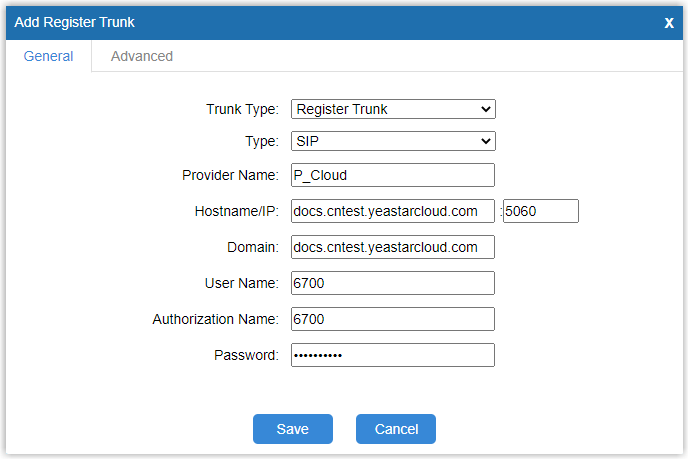
- Trunk Type: Select Register Trunk.
- Type: Select SIP.
- Provider Name: Enter a name to help you identify it.
- Hostname/IP: Enter the domain name of Cloud Voice PBX system and the SIP port. In this example, enter docs.cntest.cloud-voicecloud.com and the default SIP port 5060.
- Domain: Enter the domain name of Cloud Voice PBX system. In this example, enter docs.cntest.cloud-voicecloud.com.
- User Name: Enter the username provided by Cloud Voice PBX system. In this example, enter 6700.
- Authorization Name: Enter the username provided by Cloud Voice PBX system. In this example, enter 6700.
- Password: Enter the password provided by Cloud Voice PBX system.
- Click Save and Apply Changes.
Result
- On PBX web portal (), the trunk status displays
 .
..png)
- On TG400 gateway web interface (), the trunk status displays "Registered".

It is concluded that Cloud Voice PBX system is connected to Cloud Voice TG400 gateway; 4 4G trunks are extended on Cloud Voice PBX system.
What to do next
- To make outbound calls through the extended 4G trunk, see Make Outbound Calls through a Designated 4G Trunk.
- To receive inbound calls through the extended 4G trunk, see Route Calls from Different Carriers to Different Destinations.