Download External Chat Logs
This topic describes how to download external chat logs for legal compliance, dispute resolution, training, or other purposes.
Requirements
The firmware version of Cloud Voice is 84.13.0.25 or later.
Procedure
- Log in to PBX web portal, go to .
- To download all chat logs, click Download at the top
of the list, then click Download All Chat
Logs.

- To download specific chat logs, do as follows:
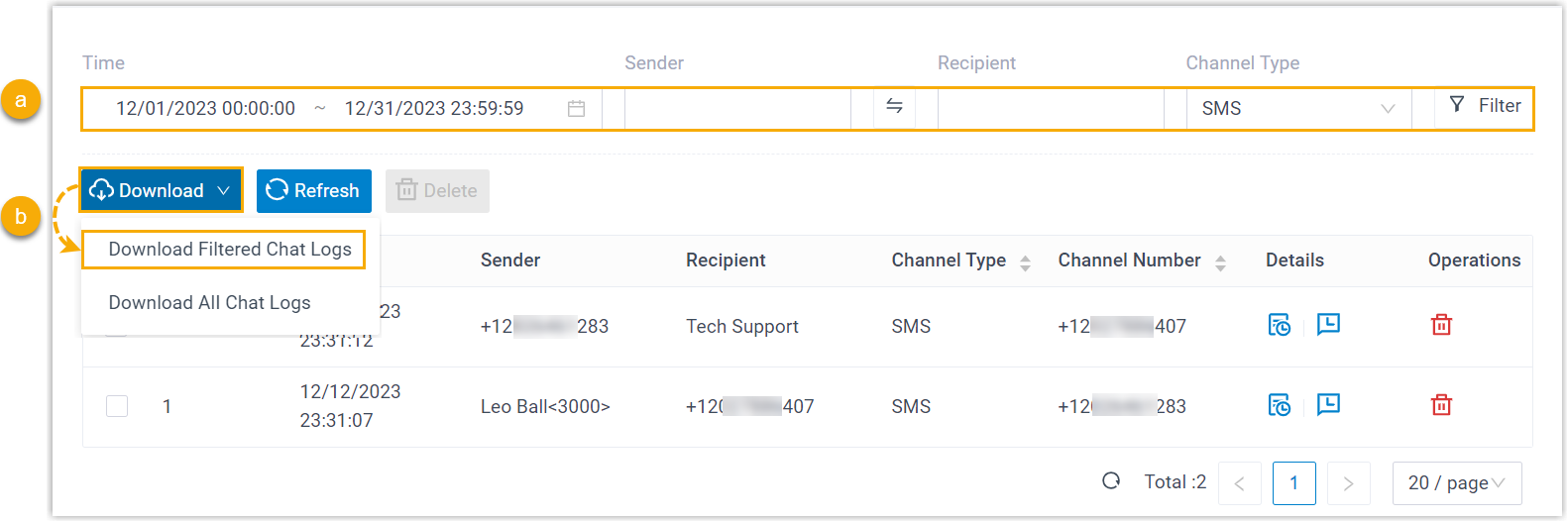
- Set criteria to filter the desired records.
The relevant records of external chat sessions are displayed on the page.
- At the top of the list, click Download, then click Download Filtered Chat Logs.
- Set criteria to filter the desired records.
Result
The external chat logs are downloaded to your computer, and each downloaded chat log
has two CSV files:
- Session_Record: This file includes basic information about all the chat sessions in the download list.
- Chat_Data_Record: This file contains detailed chat histories of the entire chat session.